Showing posts with label hp mini 311. Show all posts

30 October 2010

Some Things Don't Make Sense

I forgot to mention that, in fact, I did order a keyboard protector for my Mini MacBook Pro a few months back.

Actually I forgot about the whole thing until yesterday when my dad told me I owed him Php 40. It turned out that he received a parcel from the local post office some time during the week. I paused a bit to chew on that bit of info he had just thrown at me - not because I thought he was trying to pull off an extortion trick on me but because I simply was not expecting any delivery.

But there it was, that familiar little yellow, bubble-wrap padded envelope, sitting on our computer desk at home. It was a silicone skin for the Mini 311 keyboard!

Yeah, I remember ordering that stuff for only Php 145 - free delivery too. But I don't remember exactly what my motivations were to get one.

I'm not gonna lie and justify my purchase; I bought it because it was cheap. I remember paying Php 300 for a silicone keyboard protecter fro my EeePC 701 from a local seller I met at the forums. And perhaps I was suffering from an attack of OCD that time I was surfing ebay and I thought bring the "clinical clean" to my netbook grooming habits? Maybe.

But one thing's for sure - it's not exactly ergonomic to install a keyboard protector on the HP Mini 311. Or maybe it's just this specific cheapo keyboard protector - I thought I was getting one of those ultra thin stuff but the keyboard skin I received wasn't one. Right now, I'm typing this post with the skin on.

I did notice that dust would begin accumulating on the top side which although satisifies my OCD requirements - get that, Dust, you can't get in  between my keyboard keys!!! harharhar - they feel weird under my fingertips, dust bits, that is.

For the meantime, I'm keeping the skin on - I do drink a lot of coffee when I'm working, this skin might just ensure against probable (not just possible, I am clumsy as that) spills.

Wow, I think I'm liking the feel of typing on this thing! Setting aside all the typo errors I'm now more probe to making, I'm getting the hang of this mushy feel :D

This does not make any sense at all...

Do you use a keyboard protector / skin on your Mini 311?

07 August 2010

Windows 7 & Snow Leopard (10.6.4) on the HP Mini 311


Today is UPCAT day as well as tomorrow, so even Saturday classes (my 2 MA classes included) had a holiday. I've time to post a dual-boot guide.
Before You Begin.
For best results/hackintosh experience. Update to HP Mini 311 BIOS - F.15.
You can install the stock HP F.15 BIOS which can be installed in Windows or icelord's de-whitelisted version (which unlocks the PCI slots) by manually flashing the machine.


Installation Method 1 - DVD/Optical media method

What You Need:
  1. BootCD.iso - burn this onto a blank CD-R. I recommend using the slowest setting to ensure no write errors occur.
  2. Snow Leoaprd Mac OS X Retail DVD - 10.6 base up to latest, 10.6.4 currently, should work fine. DO NOT use the restore DVD's that are shipped with real Macs (won't work) but get instead the store-bought shrink-wrapped copy from your local Apple Store or Apple Reseller.
  3. Current Project Release - HPM311DP HF6 Installer as we speak.
  4. External USB DVD drive - there HP Mini 311 models with sales packages including a Light Scribe external DVD writer drive.
  5. Mac OS X 10.6.4 Combo Update
  6. Windows 7 DVD Installer.

What To Do:
  1. With the DVD drive connected to the Mini 311 (with enough battery of course or plugged directly to an power outlet), load the BootCD-altPS2 disc you've just burned. As you power on the Mini 311, press F9.
  2. You will see a boot menu list. Use the arrow keys to choose your DVD drive and press Enter to boot from it.
  3. When Chameleon has loaded, you'll see list of icons representing drives in your system to boot from. Manually eject the DVD drive and replace BootCD-altPS2 with the Snow Leo Mac OS X Retail DVD. Wait until the drive fully loads the new DVD you've inserted as indicated by the drive's led light and/or until you hear it's finished loading the new DVD (some light mechanical sound and then drive becomes quiet).
  4. Press F5 to refresh the Chameleon boot menu. Normally, the "Mac OS X Install DVD" entry is added at the far right of the horizontal row of drives available. Use arrow keys to select "Mac OS X Install DVD" and press Enter key.
  5. Once you've selected the language, go to Utilities Disk Utility > Partition. Create 2 partitions - the 1st partition for Windows, the 2nd for Mac OS X. For now, you can format both of the drives as "GUID Partition Table" and "HFS Journaled (Extended)". I also suggest you name the resulting volume "Macintosh HD", just like in real Macs. 
  6. Proceed with installation of Mac OS X on the 2nd partition. You will get an error message that the "Installation Failed". This is perfectly normal; OS X only told you that cause it's detected that the hard drive is not bootable which is something we'll deal with later.
  7. Use the same BootCD-altPS2 disc to boot up Mac OS X on your HP Mini 311 for the first time. Just choose the "Macintosh HD" drive icon in the Chameleon boot menu.
  8. Configure your User Account and Install the Mac OS X 10.6.4 Combo Updater. Restart.
  9. Boot up the Mini 311 with the Windows 7 DVD. After choosing the language and clicking  "Next", once you get to the "Where do you want to install Windows?" dialog box, format the partition you allotted to Windows 7 (partition 2) since EFI is your partition 1. If you want the partitions to be absolutely clean - as in no "Unallocated Space" between partitions 1 and 3 or between Win 7 and Snow Leo - you can opt to delete partition 2 then create a new one in replacement. Windows 7 will create 2 partitions (100 MB system reserved and main Win 7) but we don't want that. So delete the main Win 7 partition and choose "Extend" option to, well, extend the 100 MB System Reserved partition to the now "Unallocated Space". Proceed with installing Windows 7.
  10. The HP Mini 311 will restart and you'll notice that the default OS that it boots up is Windows 7. Just boot into Windows 7 to configure your User Account and login to your Desktop for the 1st time.
  11. Boot into Mac OS X. You do this using the BootCD-altPS2.iso and choosing "Macintosh HD". Once you're inside the Desktop, install the HPM311DP HF6 Installer.pkg. Installing HF6RC4 will configure and make OS X the default OS for the HP Mini 311.
  12. Boot the Mini 311 again using the Windows 7 DVD installer and press Shift + F10 to bring up the Command line. Activate the Windows 7 partition (partition 2) using diskpart, press "Enter" after each line:
    1. diskpart
    2. select disk 0
    3. select partition 2
    4. active
    5. exit
  13. Once back in the main Windows 7 installer dialog screen, choose "Repair Computer" option. Follow the on screen guide to repair boot for Windows 7. Restart the Mini 311.
  14. Once again, boot with the Windows 7 DVD installer and press Shift + F10 again. This time, we will activate EFI partition (partition 1):
    1. diskpart
    2. select disk 0
    3. select partition 1
    4. active
    5. exit
  15. Quit the Windows 7 installer and restart the HP Mini 311. As the the machine starts up, press and hold F8 key. This will bring up the Chameleon boot menu. You should be able to see 2 bootable volumes: "Untitled" (NTFS) and "Macintosh HD" (HFS).
Congratulations on your Mini MacBook 311 Snow Leopard & Windows 7 dual-boot!

Other Little Tweaks.
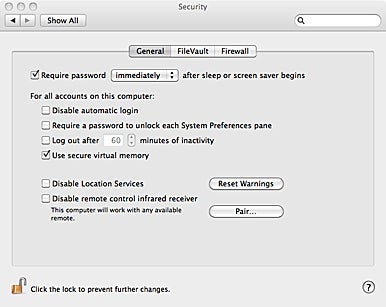
Disable "Use secure virtual memory". In Mac OS X, go to System Preferences > Security General tab > uncheck "Use secure virtual memory". It would require restarting for the change to be fully applied. We do this to help ensure Sleep function has no problems on our hackintosh.
image from macworld.com

Replace stock WiFi with a Snow Leopard compatible card - For what is a netbook without wireless connectivity, right? Unfortunately, the HP Mini 311's stock wireless module does NOT work under Snow Leopard. Hit the links below for further details:

- Prevent Windows 7 from installing drivers for the stock WiFi + BT combo card. I recommend using the additional WiFi card in Windows 7 for connecting to the internet instead of the stock WiFi + BT combo card. Caution: this will disable Bluetooth under Windows but it will be functional in Mac OS X. Click here for the How-To-Guide.

15 June 2010

Back In Biz

image from www.brianmicklethwait.com

This makes me one very very very happy hackintosher! Has Christmas just arrived early this year?

Though I don't know why the repair tech put me on F.02 BIOS and what's worse, the warranty start date on the bios page was put to 11/20/2009 when it was 12/22/2009 originally (the date I bought my Mini 311)...hmmm....

Anyhow, my serial no., when checked at the HP site returns a good date so that's that. And the most important part is that they didn't suspect I was responsible for this incident at all. :-) My unit was fixed for free. Gratis.

I'm now on F.15, icelord unlocked. I could very well try overclocking again, but for now, I'm still on Windows 7. For as much as I want to "OS X-ify" my adored Mini 311 immediately, I've to remember that there's an 8-5 day job waiting for me and without which I wouldn't be able to fund my tech addiction, so I definitely have to sleep tonight. Plus I'd prefer to get overclocking done and stabilized prior to installing Snow Leo and why you might ask? I don't know either - just my OCD kicking in again.

So, overclocking gurus out there, please help the noob right  here who is in dire need of your wisdom. :-)

P.S. I bricked the Mini 311 the night before the Philippines' 2010 Elections. It took roughly the same amount of time, which is around a month or so, for Noy Noy Aquino to be declared President elect and for HP to repair my Mini 311. Gosh, that was really inspiring customer service from HP, I must say @_@

03 June 2010

Malaysia


No, I'm not going off to Malaysia, Truly Asia, no thank you.

It's that local store *******, after about calling them 4 times, one of the staff actually cared to call me back for some update on my bricked Mini 311. The service center is ordering parts from Malaysia.

01 April 2010

Stock F.14 BIOS, HP Mini 311, Apple AirPort Broadcom 4328 N

So there was absolutely something going on that I didn't quite understand the first time I attempted to install my Apple AirPort card on my HP Mini 311. Somehow, it would get stuck at boot up. I even thought at one point that it was VMWare wreaking havoc on my system that I immediately uninstalled it.

The "ParallelsUSBController" blah blah was NOT related to virtual machines at all - nope, not Parallels Deskstop. I got the idea of virtual machines being the root of my WiFi misery from a hackintosh forum - and reputable hackintosh forum at that but I won't name names since I wanna live peacefully and I've also forgotten the name and I'm too lazy to dig into my browsing history.

If you've installed a new bios and happen to have also installed a new card onto the 311's PCI slot, there's huge chance of you forgetting that you're running the machine directly plugged into electrical source - i.e. no battery installed (cause that's how we flash the bios, right? some "haduken" Win + B keys + Power switch with the netbook sans la batterie).

The fix? Put the battery back before you turn on your machine again.

Easy peasy, eh? Actually, not for me. I had to resort back to F.04 (cracked by icelord) thinking that F.14 was just plain impossible for my Mini 311. And all that was because I didn't put the battery pack back in first.

Now I'm happy that I now have a blue wireless switch led light instead of the perpetual red-orange glow which didn't match my svelte little machine at all. Profound reason, huh? I can't even toggle anything.


Obsessive Compulsive Disorder.

Written on my resurrected HP Mini 1001TU.

31 March 2010

Perfect Mini MacBook

As promised, here's the post where I'll tell everyone who cares to read how finally I transformed my HP Mini 311 in the perfect "Mini MacBook", or in more general terms perfect "Mac Netbook".

Earlier I ordered a true blue Apple AirPort Broadcom 4328 wireless N card off of e-bay, but which didn't work with my Mini 311 when I first tried. Something about a "ParallelsConnectUSB(0x4c6af80): :start() Control service not started!" getting me stuck at boot. But that's all in the past.

My recently resurrected HP Mini 1000 prompted me to try again. I wasn't really hopeful but, unlike the Mini 1000 which didn't quite miraculously resurrect, my "stuck at boot" issue with the Mini 311 being suddenly resolved fit the bill of what I call a miracle.

There was still that nasty "ParallelsConnectUSB(0x4c6af80): :start() Control service not started!" but I could very well get into my Desktop instead of making do with the command line - single-user mode with the Apple AirPort plugged into the Mini 311's PCI guts had been the only feasible way I could interact with my hackintosh.

There I was, beside myself, as I stared into that familiar wallpaper comprised of a train silhouette in dark grey against a lighter shade of grey background which I'd gotten from a link in Minimal Mac. And even my abdominal cramps wouldn't dampen that little bauble of joy I felt in that instant!~

Now this AirPort card was a full-height card and therefore I could only put it into the extra full-height PCI slot of the 311. However, the stock antenna, whose receptors were neatly tucked inside the 311's lid around the screen, could only reach the half-height PCI slot. Since I already had my U.fl antennas handy, I tried to fit it on. But wireless signal was very weak and almost after 2 hours of trying different arrangements, I knew I had to use the stock 311 antennas.

Here's a pic to illustrate what happened.
Apparently, the wires for the antenna are long enough, one just has to re-route it to reach that full-height PCI slot. How I did it? No price for guessing but use your imagination. And yes, I did use screw drivers.

So here's the final setup:
I used one U.fl antenna for bluetooth courtesy of the stock Broadcom 4312 BT/WiFi card which is now back in its PCI cradle. Remember to connect to "J2" on the card because I recently discovered that that's the port for bluetooth, with "J1" being for the WiFi chip.

There's a noticeable change in how much the hard drive can sink inside its comfy slot now but nothing to worry to about cause the cover flap would still nicely match up with the rest of the chassis once put on and screwed.

Also be sure to install Apple AirPort Client Update 2009-02 to fix any connection dropping issues that may occur.

A perfect Mini MacBook alright!

Or not. At least until I sort out 10.6.3 on this little baby. ;)

19 February 2010

Good News | Bad News

I should be preparing for my report in my MA class tomorrow but instead of attempting (for the Nth time) to get some organized outline from O. Ducrot's concept of Polyphonie (whose reluctance to drop that elusive "producteur empirique" screws everything for me cause I can't really grasp how that is different from the "locuteur"), I'm updating my blog with a new post.

Good News #1 : U.fl Apple antennas have been delivered at home! 
Finally, after 18 days of waiting!
I've recently ordered U.fl antennas for my HP Mini 311 to fix bluetooth signal. If you remember, I had to transfer the stock BT/WiFi combo card of the 311 to the full height extra PCI slot so I could use my dead Mini 1001TU's Snow Leopard compatible b/g WiFi card on the half height slot and because of that, the stock antenna could not reach the BT/WiFi card where it has resided ever since.
Bluetooth would still work but I had to keep my cellphone in very close proximity (read: on top of the keyboard deck) to transfer stuff and the connection then was not even half decent.
Below are pics of my new setup:
I used glass frost film to secure the card, the length of the antenna coiled and fitted in the remaining free space in the full height pci slot.
I haven't tried experimenting with which port on the card gives better signal for BT but I started with J2, see middle pic above, and I could control the cursor on my Mac OS X 10.6.2 desktop from my desk to my bed and so I stuck with that config.

Good News #2 : My Mini MacBook 311 has its own 11.6" bag from TechAir
The bag supposedly retails for £19.99 but I got mine for only Php 639 (£ 8.98); and it comes with a free TechAir optical mouse too! The laptop bag model doesn't offer TechAir's trademark TechAir Protection technology, which admittedly makes this good deal not really a good one. 
But I was only looking for something with which to carry my Mini 311 tomorrow - I usually just shove it in my A4-sized clear file holder with zipper (something like this, only mine's clear) along with my photocopied reading materials for my MA class. But tomorrow, I'll be attending the christening of a friend's baby boy and I'm tobe godmother, so I need something with some cushioning and can be strapped securely to my body while I jump from church to university.
Here's my 11.6" TechAir baggie:
 
 Yay! I'm so excited to use it tomorrow!

Now for the bad news: The HP Mini 311 Darwin Project thread has been closed
Links to the project files for installation have been taken out. 
The sad thing is that I didn't back up the latest ISO booter which also contains the HF4 installer :( I'm still thinking how best to reformulate my HP Mini 311 Snow Leopard installation guide to make it adapt to available resources in the HP Mini 311 Level 1 Support thread which, thankfully, is still up and running. Also there's still the google code page.

23 December 2009

New Toy

So I guess that makes (yet) another New Year's resolution null and void even before the New Year has come. I vowed not to succumb to gadget lusts but the HP mini 311 was just so tempting.
I'll try making an unboxing video or perhaps even just pics but in the meanwhile, here's my new baby's cousin who tempted me and succeeded:

Intel Atom N280 @ 1.66GHz 1.67GHz
2.00 GB DDR3 RAM
11.6" LCD (Glossy) @ 1366 x 768
NVidia Ion LE
WiFi b/g + Bluetooth combo card
Windows 7 Starter Edition
External DVD burner - dual layer support
Now I wonder what to do with it next?

22 December 2009

Foot In Mouth

This makes me a terrible, not to mention incredible, hackintosher noob.
Looks won over functionality or in other words, hackintosh OSx86 compatibility at the end of the day (actually, at the end of a long two-hour wait)

05 December 2009

Gadget Lust Not Appeased

This is what I wanna buy:


That's an HP Mini 311 alright. But not just any HP Mini 311. It's gotta be a white HP Mini 311.
The black version already retails here in the Philippines for Php 28,944 (around USD$500+) and it comes with an external DVD writer which you have no other choice but to include in your netbook family :


And now according to zdnet.com, the white version will require an additional $20.
Uh-oh. More trouble. But then only the black version's currently available here in the country.
Guess I'll have to wait for it to get released here. And then...and then....
I'll get one out of my own money or I meant, my own credit card rather.
Oh dear, this isn't the way to start a new year.

30 October 2009

Compaq 311 c

Here's an unboxing video for those who speak French and also for those who don't as you can also get a lot of info of what the machine feels like in this. Courtesy of blogeee.net.

14 October 2009

HP Mini 311: New “It” Guy Among HP Mini Hackintoshes

The minute his mug shots came abound the net, we've been smitten by him.


We've drooled at him.


Fantasized about him.


Wondered which method would work on him: Vanilla/Retail or hacked distro? Leopard or Snow Leopard?


hpmini311-OSX


Okay, so that sentence before this one relieves you who are reading this post. Well, Mr. HP Mini 311 is good hackintosh candidate.


Some dudes (or dudettes) have been lucky enough to get their paws on this promising HP Mini version and have gotten OS X installed:


InsanelyMac


My HPMini


It certainly appears that the much coveted graphics prowess which Ion bundle (Atom N280 + ION LE) promises to deliver works fine under OS X:
from superviza @ insanelymac
Wooo Hooo !!!
I got 1366 x 768 working !!! (looks amazing)
I used osx86 tools to insert a custom EFI string....
Let me know how you go...
The WiFi card is reportedly the same Broadcom 4315 which we love because the hacked IO80211Family.kext supports that module.


Ok, so that's about 3 components down (procie, video, wlan) but there remain a lot more stuff like audio, webcam, and that incorrigible internal mic.


On a personal note, this news is definitely good news for me. I adore the make and finish of HP netbooks and since MacBook Wind is at home, sitting at my "mini office" desk as it torrents away while I'm here about 100 plus kilometers away from it, I'll say it:


MacBook Mini feels way more solid in my hands than MacBook Wind and I've never felt it would suddenly fall apart in my own hands as I've more than once felt the latter would. ;)


So if push comes to shove and circumstances leave me no choice but to purchase a new netbook, either to satisfy a need or perhaps a want, I hope it's still an HP.


But then again, if it ain't hackintoshable. . .oh well.