Showing posts with label hp mini 311 snow leopard. Show all posts

08 August 2010

Blank Screen On Wake

The HP Mini 311 Darwin Project user experience, as of this point in time, is anything but uniform across users and HP Mini 311 models.

The cause of the problem remains unknown; there've been a healthy doze of speculations circulating ranging from the amount of RAM installed, DSDT.aml hacks, and some hocus-pocus voodoo thing I may have incorporated into the HPM311DP_063010HF6RC4.pkg installer. 

Yeah, right. Go figure. 

For the last time, let me say that I did NOT incorporate any hocus-pocus voodoo thingy and I also suggest we go forward with this issue. There's a workaround - rebuild Extensions.mkext. And this can be done in 2 ways:
  1. Mkext Tool
  2. Alter EFI v1.4's "Edit Kexts" option
Here's a short screen cap/video (sorry for the crappy quality - I had this recorded via Quick Time X using mic from the iPhone 3G earbuds, processed with iMovie and it churned it out like this):
Personally, I'd say it's Mkext Tool that's dealing with the dark arts here as I do not have the slightest inkling of how it builds the mkext. Sure it's the same set of kexts in /Extra/Extensions - the same ones we have packed in Retail Pack 0.9 Extensions.mkext, but for some reason, it has solved the blank screen on wake issue for some.

Alter EFI v1.4's "Edit Kexts", on the other hand, builds the mkext from /Extra/Extensions AND /System/Library/Extensions and as a matter of fact, poofyhairguy and I ended up calling it a "super mkext". Solves the blankscreen issue for him, this one, but not Mkext Tool.

So I leave it up to you to try both and see which one works for you.

Or maybe none would - that, I'm afraid, is beyond my understanding as the standard Retail Pack 0.9 or HPM311DP_063010HF6RC4.pkg works brilliantly for my setup.

03 August 2010

Geekbench Results (or Another Reason Why the HP Mini 311 Should Never Be a MacBook Air 2,1)

The image above shows the HP Mini 311's Geekbench results while it camouflages as a MacBook5,1. As you well know, I've been experimenting with various MacBook models to see which ones work with vanilla AppleIntelCPUPowerManagement.kext + HPET + P-States in DSDT; in short what the current HP Mini 311 Darwin Project uses. It has been reported that MacBookAir1,1 just won't work with this setup and MacBookPro5,1 (current HPM311DP default) and MacBook6,1 (theproto HPM311DP default - before vanilla AppleIntelCPUPowerManagement).

MacBookAir2,1 as I've mentioned works, albeit with a noticeable limitation - no SpeedStep, but works nevertheless compared to its sibling the MacBookAir1,1 which won't even boot up the system; i.e. Kernel Panic galore.

However, by running Geekbench on some MacBook models I've been testing, another "anomalie" as the French would call it, appears to be distinctive to the MacBookAir2,1.

It gives a much lower Geekbench result than any other MacBook model. Almost cuts the score in half! All the other models could easily surpass the 1000 score mark, but the Air2,1 tops at 666 and hitting its lowest at 613 (it's one devilishly poor score alright)

See my Geekbench results page for more details. And P.S, I think I do have the sense to make sure Geekbench was the only app running during the tests. :-)

23 February 2010

Snow Leopard on the HP Mini 311 (10.6.4)

It's high time that I updated this Installation Guide.
I hope this latest effort, I can make things simpler than ever.
Before You Begin.
For best results/hackintosh experience. Update to HP Mini 311 BIOS - F.15.
You can install the stock HP F.15 BIOS which can be installed in Windows or icelord's de-whitelisted version (which unlocks the PCI slots) by manually flashing the machine.


Installation Method 1 - DVD/Optical media method

What You Need:
  1. BootCD-altPS2.iso - burn this onto a blank CD-R. I recommend using the slowest setting to ensure no write errors occur.
  2. Snow Leoaprd Mac OS X Retail DVD - 10.6 base up to latest, 10.6.4 currently, should work fine. DO NOT use the restore DVD's that are shipped with real Macs (won't work) but get instead the store-bought shrink-wrapped copy from your local Apple Store or Apple Reseller.
  3. Current Project Release - HPM311DP HF6 Installer.pkg as we speak.
  4. External USB DVD drive - there HP Mini 311 models with sales packages including a Light Scribe external DVD writer drive.
  5. Mac OS X 10.6.4 Combo Update


What To Do:
  1. With the DVD drive connected to the Mini 311 (with enough battery of course or plugged directly to an power outlet), load the BootCD-altPS2 disc you've just burned. As you power on the Mini 311, press F9.
  2. You will see a boot menu list. Use the arrow keys to choose your DVD drive and press Enter to boot from it.
  3. When Chameleon has loaded, you'll see list of icons representing drives in your system to boot from. Manually eject the DVD drive and replace BootCD-altPS2 with the Snow Leo Mac OS X Retail DVD. Wait until the drive fully loads the new DVD you've inserted as indicated by the drive's led light and/or until you hear it's finished loading the new DVD (some light mechanical sound and then drive becomes quiet).
  4. Press F5 to refresh the Chameleon boot menu. Normally, the "Mac OS X Install DVD" entry is added at the far right of the horizontal row of drives available. Use arrow keys to select "Mac OS X Install DVD" and press Enter key.
  5. Once you've selected the language, go to Utilities > Disk Utility and format the drive with "GUID Partition Table" and "HFS Journaled (Extended)". I also suggest you name the resulting volume "Macintosh HD", just like in real Macs. After the installation, you will get an error message that the "Installation Failed". This is perfectly normal; OS X only told you that cause it's detected that the hard drive is not bootable which is something we'll deal with later.
  6. Use the same BootCD-altPS2 disc to boot up Mac OS X on your HP Mini 311 for the first time. Just choose the "Macintosh HD" drive icon in the Chameleon boot menu.
  7. Install the Mac OS X 10.6.4 Combo Updater. Do not restart yet. If you do accidentally hit that "Restart" button, you can always use the BootCD-altPS2 disc to boot up your Mini again.
  8. Run the HPM311DP HF6 Installer.pkg to set up EFI on the hard disk, thus letting the Mini 311 boot on its own without the need for the BootCD-altPS2 disc. Restart the computer for changes to be applied.
Congratulations on your Mini MacBook 311!

Other Little Tweaks.
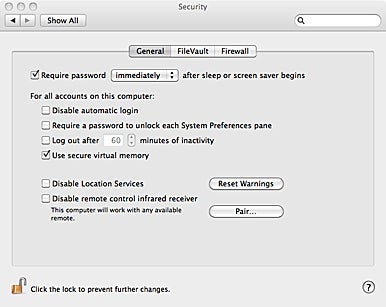
- Disable "Use secure virtual memory". System Preferences > Security > General tab > uncheck "Use secure virtual memory". It would require restarting for the change to be fully applied. We do this to help ensure Sleep function has no problems on our hackintosh.
image from macworld.com

- Replace stock WiFi with a Snow Leopard compatible card - For what is a netbook without wireless connectivity, right? Unfortunately, the HP Mini 311's stock wireless module does NOT work under Snow Leopard. Hit the links below for further details: