What You Need:
- External USB hard drive/flashdrive "USB drive" - 8 gigs or more
- Lizard application
- Latest Retail Pack for the HP Mini 311 - currently Retail Pack 0.9
- Image of Snow Leopard Mac OS X Retail DVD
- A working Mac or hackintosh
- Launch Disk Utility and format your USB drive - my personal preference is GPT/HFS Extended Journaled
- Use the "Restore" function of Disk Utility to restore the Snow Leo Retail DVD onto your USB drive - make sure you have previously scanned the image (.dmg or .ISO file) for restore, just locate the image file at the list on the left panel and access Disk Utility's File > "Scan image for restore" function.

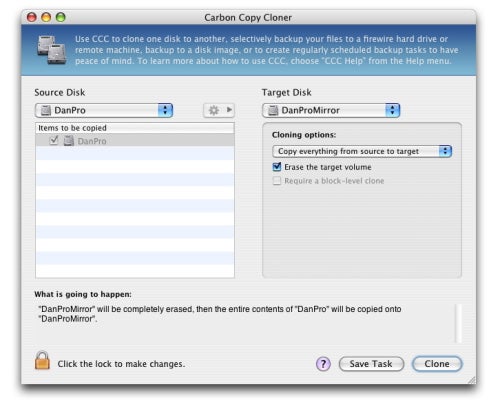
- Or, use Carbon Copy Cloner. Be sure your Mac OS X DVD image is mounted first. (replace that "DanPro" with the DVD image and "DanProMirror" with your USB drive -I forgot the screenshot)
- Once the restore or cloning is completed, launch Lizard. Click on "Install and Update".
- Choose your USB drive from the list of drives - I suggest that you limit the mounted drives to 2 or 3 so you won't get confused. I named my USB "SnowDVD" as you can see:

- Then at the bottom part of the window, click on "Select folder" button. Point Lizard to the "Bootloader" folder inside Retail Pack 0.9. Click on "Install" button.

- Once that's done, copy the entire "Extra" folder from Retail Pack 0.9 onto the root of your USB drive.




And it's ready for use with your Mini 311. This can be used to:
A. Install Mac OS X on the Mini 311 (fresh installation)
- Use the Installer USB to boot up your HP Mini 311. It will automatically boot into the OS X Installer program.
- Format you drive as GPT > HFS + Journaled. Name your drive for ex. "Macintosh HD". OS X Installer may say that Installation has failed. Don't worry; this is normal. Restart your computer.
- Boot up your Mini 311 again with the same USB Installer and as Chameleon loads, press F8 and you'll be presented with a list of bootable volumes.
- Just choose the "Macintosh HD" drive icon in the Chameleon boot menu via arrow keys. Press Enter key to boot your selection.
- Configure your User Account and once you're in your Desktop,
- Install the Mac OS X 10.6.4 Combo Updater. Do not restart yet.
- Install HPM311DP HF6 Installer.pkg to set up EFI on the hard disk, thus letting the Mini 311 boot on its own without the need for the USB Installer.
- Restart the computer for changes to be applied.
B. Boot an existing Mac OS X install on the Mini 311 (if and when you sabotaged your EFI setup)
*Just do steps 3 - 8 (skipping step 6, of course, if you've already updated) of letter A above.
And, in theory, it should work with Snow Leo Retail DVD's upto 10.6.4 10.6.6 just fine (Retail Pack 0.9 on a Mac OS X USB Installer). It's practically the same stuff (kexts and all) in the Extra folder.
Well what do you know? It stopped raining! I can go home now, bye!!


