Showing posts with label Atheros AR5B93. Show all posts

17 July 2010

A Typical Hackintosher's Saturday

or lack of a social life.

This not-so-hackintosh-noob is skipping M.A. school today because she accidentally rubbed some insect repellant lotion on her right eye last night and right now she looks like a pirate, or pirate-esse (if ever such a word existed) with one eye barely squinting at her Mini MacBook Pro 311's screen as she composes this post. Alright, that was an exaggeration. The irritation is already abating, hitting its worst last night as she slept at around 2:00 am watching TV. Enough of referring to myself in the third person (I must've been listening to too much podcasts for my M.A. - Antoine Compagnon's lecture at the Collège de France, "Proust, mémoire de la littérature" about narration first person vs third person, the validity and completeness of it).

Back to OSx86.

I gave the Atheros AR5B93 WiFi card I recently bought and destroyed one last chance. And in case you're wondering how I managed to work those tiny U.fl pins and screws, this transpired before the insect repellent lotion incident. The verdict? It's definitive that I've wasted yet another $17. Boot up just won't go past this line:

There's something I learned about this specific WiFi card; aside from it being recognized by Mac OS X 10.6 as AirPort Extreme right out of the box (or anti-static wrap and brown post office envelope), it's driven by the AirPortAtheros21.kext plugin inside of IO80211Family.kext with Dev ID "pci168c,2a". That there, is the exact Dev ID that I got when I inspected the card under Windows XP.

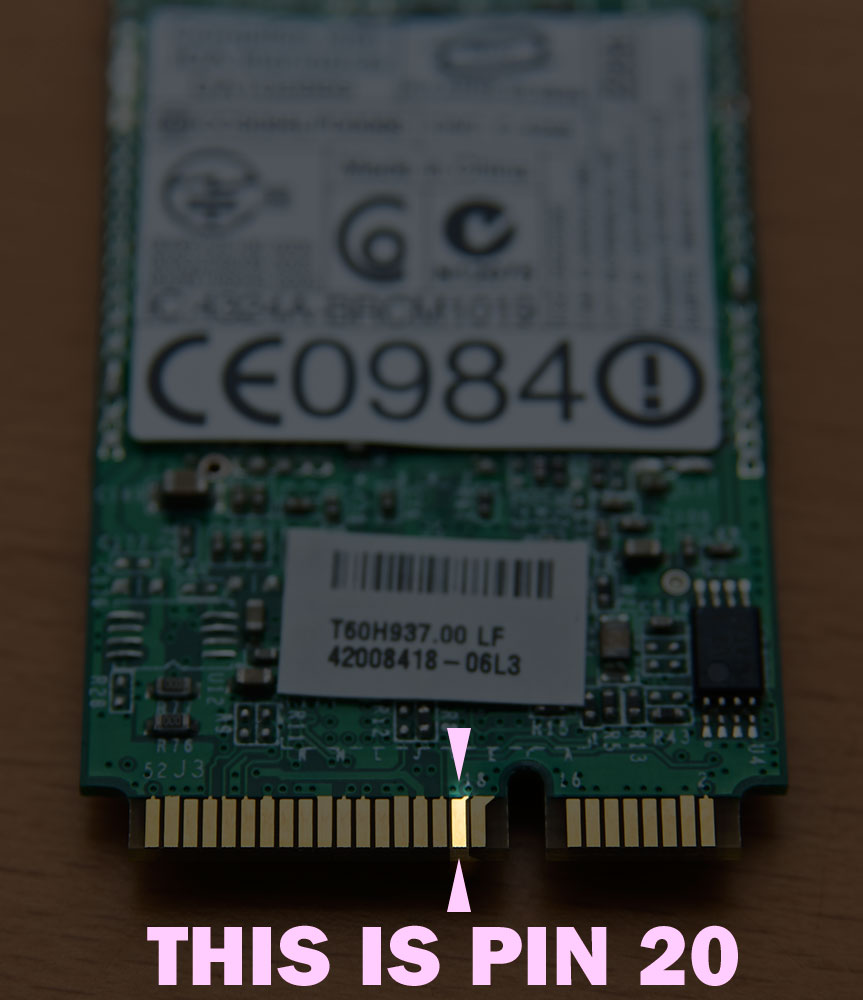
Yes, Windows XP - not on my Mini 311. On my MSI Wind. Yep, although the card would cause Windows 7 on the 311 to freeze, with the Wind, despite the PIN 20 disaster, it doesn't cause any freeze ups on boot. So I guess this means this Atheros card will just have to replace the Wind's aging, not to mention practically unused Realtek card. This will be solace for that act of imbecility.

And since I'm skipping school (my right eye still itches at times and I have to constantly apply hot compress), I thought I'd entertain myself with one of the things I love doing the most: installing Mac OS X. So I've currently transferred my little but very fortunate MSI Wind (much as I begrudge that it seems to be getting all those new hardware) to a larger table to reinstall a dualboot Snow Leopard + Windows 7 setup. I'm putting Win 7 in the first partition to avoid any problem with Chameleon not picking its NTFS formatted volume up at boot.
That's my MacBook Pro 5,1 on the left, and my MacBook 6,1 on the right - once I sort its smbios.plist out after the install and, hopefully, 10.6.4 update are done and over with.

Oh and by the way, since I'm on-line and e-bay is just a click away, I've just had this new Atheros ordered:
Remind me not to get ahead of myself and destroy this one again. Supposing e-bay seller cikeleapple didn't scam me.

I also wish I'd stop sabotaging myself with insect repellant lotion.

12 July 2010

Atheros AR5B93 - Perfect Mini MacBook

Or so I thought. But don't blame it on the Atheros AR5B93 card that came, finally, last Friday. Somewhere in between the challenge of solving the Snow Leopard + Windows 7 dual-boot puzzle on the HP Mini 311 and my excitement over receiving yet another new, err, "hardware", I may have slipped up.

We all know about HP's white lists and locked PCI slots and there's also the fact of this so called "soft switch" which in essence, means that an HP laptop uses this to "switch off" hardware installed in it. Now this soft switch is not something that Mac OS X appreciates. So, going straight to the point, what it means for the HP Mini 311 hackintosh user like me is that they would have their WiFi, that has always worked brilliantly, to suddenly not work. i.e. "No AirPort card installed" message in place of the signal indicator at the menubar.

This particular scenario, I've discovered, is more likely to happen when one is on dual-boot. Specifically a Windows version + Mac OS X. It appears to me that Windows appreciates this little trick of HP that after booting into Windows 7 and Mac OS X alternately for a while, I find my WiFi card disabled. And I have to use an Ubuntu USB flashdrive to try re-enabling the WiFi card thus  I've proven Linux to be above this soft switch situation. But sometimes, as good as Linux undoubtedly is, this stupidity can sometimes be beyond its tolerance level and I resort to re-seating my WiFi card in the PCI slot.

Taping PIN 20 of the WiFi card solved the problem for me, at least in the Broadcom BCM4312HMG card's case and so finally, I decided to peel the copper contact strip of that card's PIN 20 to make the fix permanent. And that's exactly where I say that I've started to slip up, perhaps.
*NOTE: this Broadcom BCM4312HMG is NOT the same as the HP Mini 311's stock WiFi card, which is a Broadcom BCM4312HMGB . That Broadcom BCM4312HMGB DOES NOT work in Snow Leopard. People, seriously, let us try to accept the fact and move on ;-)
You see, with my happy and giddy, and not to mention a bit troubled (with the dual-boot issue a fellow forumer was having) state last week, I had the equally happy idea of doing the permanent fix on my all brand new Atheros AR5B93.
It does work, mind you. It's even recognized by Snow Leopard as AirPort Extreme without me having to flash its Device ID's in Linux. My only problem now is that it would cause my HP Mini to freeze in 10.6. And when I updated my fresh install (I had to do a fresh install for the dual-boot experiment) to 10.6.4, I would get stuck at boot.

I'm really suspecting it's my "PIN 20 attack" that caused this problem and may have damaged my Atheros AR5B93. Perhaps it's only the Broadcom cards that benefit from that specific solution?

Anyone who have experience with Atheros AR5B93 on their HP Mini 311 share their feedback regarding the freeze ups at boot?